
Google Business Profile for Handymen: Setup & Ranking Guide (2026)
How do handymen show up on Google Maps? Set up a Google Business Profile in 6 steps, then rank in the local pack with reviews, photos, and the right category.
Quick answer: To get your handyman business on Google Maps, create a free Google Business Profile at business.google.com. Register as a service-area business (hide your home address, list the cities you serve), set "Handyman" as your primary category, verify your business (a few days to two weeks), then rank in the local "Map Pack" by collecting Google reviews (aim for 10+ to start, 50+ to dominate), posting photos of your work weekly, and keeping every field complete. Reviews are the #1 ranking factor — and the Map Pack captures a large share of local-search clicks (often cited around 40–44%), all for free.
When a homeowner needs help, they don't open Thumbtack — they type "handyman near me" into Google. What shows up first isn't a list of websites (which is exactly why you probably don't need one). It's a map with three local businesses pinned to it: the Google Map Pack. It sits at the very top of the page, and studies of local search consistently find it captures a larger share of clicks than the organic results, paid ads, and everything below it — often cited around 40–44% of all clicks on a local query.
Getting into that box is free, and it's the highest-quality lead source most handymen will ever have. The tool that puts you there is a Google Business Profile (the listing formerly called "Google My Business"). This guide walks through the exact setup a solo handyman needs — service-area config, the right category, verification — and then how to actually rank once you're listed.
This is the deep-dive on the single most important method from our 12 ways to find handyman jobs. If you only do one marketing thing this month, do this.
Step 1: Claim Your Profile as a Service-Area Business
Go to business.google.com and click "Add your business to Google." Enter your business name exactly as you want it to appear — for example, "Dave's Handyman Services," not "Dave's Handyman Services | Best Repairs in Sacramento." Stuffing keywords into your name violates Google's guidelines and can get your profile suspended.
The critical choice for a handyman comes next: storefront vs. service area.
- You don't have a shop customers visit — you drive to them. So when Google asks whether you want to add a location customers can visit, choose "No."
- This makes you a service-area business (SAB). Your home address stays hidden, and instead you list the areas you serve.
| Setting | What a handyman picks | Why |
|---|---|---|
| Business type | Service-area business | You go to the customer; no public storefront |
| Address | Hidden | Protects your home address from being public |
| Service area | Cities / ZIP codes you cover | Tells Google where to show you |
| Primary category | Handyman | The exact term homeowners search |
Service-area setup is fully supported and standard for the trades — it's how plumbers, electricians, and handymen all list. Don't fake a storefront address; Google catches it and suspends profiles for it.
Step 2: Choose the Right Category (This Drives Your Ranking)
Your primary category is one of the strongest things you control for ranking. Google weights it heavily when deciding which searches to show you for.
- Primary category: Set this to "Handyman." It maps directly to "handyman near me" searches.
- Secondary categories: Add up to a handful for the specific work you do most — for example, Drywall contractor, Painter, Deck builder, Bathroom remodeler, Fence contractor. These help you show up for those niche searches too.
Don't add categories for work you don't actually do — irrelevant categories dilute your relevance and can attract the wrong leads. Pick the 3–5 that genuinely describe your bread-and-butter jobs.
Step 3: Define Your Service Area Honestly
List the cities, neighborhoods, or ZIP codes you genuinely serve. Google lets you add up to 20 areas, but don't max it out with places you'd never drive to. A tightly defined, realistic service area ranks better than a sprawling one, because Google favors businesses that are close to the searcher.
If you mostly work one city plus its suburbs, list that city and the suburbs — not the entire metro region. Proximity is a real ranking factor: the closer your defined service area is to where someone is searching, the more likely you are to appear.
Step 4: Fill In Every Field — Including Your Website
Google's own local ranking guidance is blunt about this: "Make sure your business info is as complete as possible." A half-filled profile ranks below a complete one. Fill in:
- Phone number — a real number you answer. This is how most Map Pack leads reach you (they tap "Call").
- Hours — including whether you do emergency / weekend work.
- Services — list each service with a short description and a price or price range.
- Business description — 750 characters describing what you do and where, written naturally (not keyword-stuffed).
- Website — this field matters more than handymen think.
What do you put in the website field if you don't have a website? You don't need to build one. Point it at a profile you fully control. A free HandymanCan profile gives you a clean link like handymancan.org/yourname with your services, rates, photos, and reviews — exactly what a homeowner wants to see after they find you on the map. It takes five minutes, costs nothing, and gives Google a website to associate with your listing (which helps your ranking and your credibility).
Your skills deserve to be seen.
Join handymen who use HandymanCan to get found by local clients — completely free.
No credit card. No catch. Takes 5 minutes.
Step 5: Verify Your Business
Google won't show your profile publicly until you verify that the business is real and yours. Depending on your location and business type, verification options include:
- Video verification — record a short video showing your tools, work vehicle, and business signage. This is now the most common method for service-area businesses.
- Phone or text — Google sends a code.
- Postcard — a code mailed to your address (slower; a few days to two weeks).
- Email — available for some profiles.
Verification can take anywhere from a few minutes (video/phone) to two weeks (postcard). Don't skip it and don't try to game it — an unverified profile is invisible, and a faked one gets suspended. Once verified, your profile goes live on Search and Maps.
Step 6: Add Photos — Then Keep Adding Them
Photos are not optional. Google's data shows that profiles with photos earn substantially more engagement — roughly 42% more requests for directions and 35% more click-throughs than profiles without. For a handyman, the photos are also your portfolio.
Upload at minimum:
- A clear logo and a profile photo (you or your truck).
- 10–20 before/after shots of completed jobs — these are your most persuasive asset.
- Photos of you working, your tools, and your branded vehicle.
Then keep adding a few every week. A profile that's regularly updated signals an active business, which Google rewards.
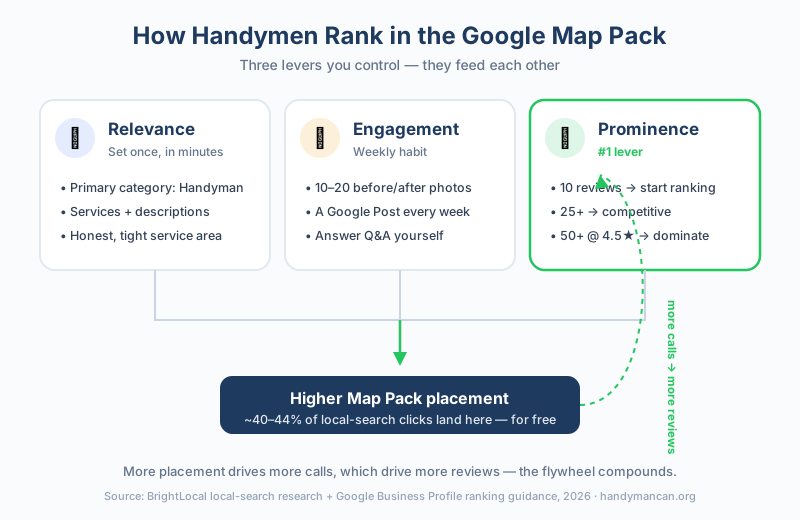
The three levers a handyman controls on Google Maps — relevance, engagement, and prominence — feed each other. Reviews are the heaviest single lever.
How to Rank in the Google Map Pack
Once you're verified and complete, ranking comes down to three things Google has publicly confirmed it weighs: relevance, distance, and prominence.
| Factor | What it means | What you control |
|---|---|---|
| Relevance | How well your profile matches the search | Primary category, services, description |
| Distance | How close you are to the searcher | Honest, tight service area |
| Prominence | How well-known and trusted you are | Reviews, photos, activity, citations |
You can't move closer to every searcher, and your category is set in a minute. So the real ongoing work — the thing that separates the #1 handyman from the #11 handyman — is prominence, and prominence is driven mostly by reviews.
Reviews Are the #1 Lever
Across every credible analysis of Map Pack ranking, Google reviews come out as the strongest single signal. More reviews, higher ratings, and recent reviews all push you up.
- 10 reviews — enough to start appearing for less competitive "near me" searches.
- 25+ reviews — competitive in most local markets.
- 50+ reviews with a 4.5+ average — enough to dominate most handyman searches.
Getting there isn't luck — it's a system. After every job, ask. We wrote a full playbook on this in how to get more reviews as a handyman, including word-for-word scripts. The fastest path: send a follow-up text the same day with a direct link to your review form. Our free text message templates include the exact review-request wording handymen use.
Two rules that matter as much as the count:
- Respond to every review — positive and negative. Google confirms that responding improves your ranking, and it shows prospects you're engaged.
- Never buy or fake reviews. Google detects review fraud and removes profiles for it. One bankrupt-the-business mistake.
Post Weekly and Answer Questions
Use Google Posts to share recent jobs, seasonal offers, and tips — a fresh post every week or two signals an active business. Seed the Q&A section with the questions homeowners actually ask ("Do you do small jobs?" "What's your service area?") and answer them yourself.
Build Citations
A citation is any other site that lists your business name, address, and phone number consistently — Yelp, Nextdoor, Angi, Bing Places, your local chamber. Aim for 40–50 consistent listings over time. The key word is consistent: your name, phone, and service area must match across all of them, or the inconsistency hurts you.
Common Mistakes Handymen Make on Google Business Profile
- Keyword-stuffing the business name — "Joe's Handyman Sacramento Cheap Fast Repairs" gets flagged. Use your real business name only.
- Listing a fake storefront address instead of using service-area mode. This is the #1 suspension trigger.
- Leaving the website field blank. Point it at a free profile you control if you don't have a site.
- Setting up the profile and forgetting it. Map Pack ranking rewards ongoing activity — photos, posts, review replies. A stale profile slides down.
- Ignoring negative reviews. A calm, professional reply to a bad review wins more trust than a wall of perfect 5-stars.
- Spreading the service area too thin. Twenty cities you'd never drive to dilutes your relevance for the ones you actually work.
How GBP Fits With Everything Else
A Google Business Profile is your free foundation, but it works best as part of a system:
- Google Business Profile gets you found on the map (this guide).
- A professional profile at the website link closes the homeowner once they find you — create yours free.
- Reviews feed both: more reviews rank your GBP higher and make your profile more convincing. (Here's how to get them.)
- Paid ads (Google Local Service Ads, Facebook) fill gaps while your free sources grow — see how to advertise a handyman business for what's worth paying for, and our find handyman jobs guide for every channel.
- AI assistants are the newest discovery channel — 45% of consumers now use tools like ChatGPT to find local businesses, and the same GBP-plus-reviews foundation is what gets you mentioned. See how to get your handyman business recommended by ChatGPT & AI.
Set up the profile this week. Add ten photos. Ask your next five customers for a Google review. Within a few months, "handyman near me" starts working for you instead of your competitors — for free.
Sources
- Google Business Profile — Free tool to claim and manage your listing on Google Search and Maps
- Google: Tips to improve your local ranking — Google's official guidance on relevance, distance, and prominence
- Google: Add or claim your Business Profile — Official verification and setup instructions
- BrightLocal — What is the Google Local Pack? — Data on Map Pack click share in local search
- BrightLocal — Google My Business Insights Study — Benchmark data on how photos affect profile engagement
- BrightLocal — Local Consumer Review Survey 2026 — Annual data on how reviews influence local hiring decisions
Statistics reflect publicly available local-search research as of June 2026 and vary by market. Google's verification options and ranking factors are subject to change.
Frequently Asked Questions
Do handymen need a Google Business Profile?
Yes. A Google Business Profile is the single most important free lead source for a handyman. It's what puts you in the Google Map Pack — the box of three local businesses that appears when someone searches 'handyman near me.' That Map Pack sits at the top of the page and captures a large share of local-search clicks (often cited around 40–44%), and it costs nothing to claim.
Can a handyman get a Google Business Profile without a storefront?
Yes. Handymen register as a 'service-area business' (SAB) instead of a storefront. You hide your home address and instead list the cities or ZIP codes you serve. Google fully supports this — it's the standard setup for handymen, plumbers, and electricians who go to the customer.
How many Google reviews does a handyman need to rank?
There's no fixed number, but reviews are the strongest Map Pack ranking signal. Aim for at least 10 reviews to start showing up, 25+ to compete, and 50+ with a 4.5-star average to dominate most local handyman searches. The handymen ranking #1 in competitive metros often have 100+ reviews.
How long does it take to rank on Google Maps as a handyman?
Verification takes a few days to two weeks. After that, a brand-new profile with steady reviews and weekly photos typically starts appearing for less competitive 'near me' searches within 1–3 months, and reaches the top of the Map Pack in 3–6 months in most local markets.
What category should a handyman choose on Google Business Profile?
Set 'Handyman' as your primary category — it matches what homeowners search and what Google ranks. Then add secondary categories for the specific work you do most, such as 'Drywall contractor,' 'Painter,' or 'Deck builder.' Your primary category carries the most ranking weight, so don't dilute it.
Your skills deserve to be seen.
Join handymen who use HandymanCan to get found by local clients — completely free.
No credit card. No catch. Takes 5 minutes.
Related Articles

Handyman Business Name Ideas: How to Pick One That Wins Jobs (2026)
Need handyman business name ideas? Get curated names by category, the 5 rules of a name that wins jobs, and how to check it's available before you commit.

How to Write a Handyman Business Plan (2026 Guide + Template)
Write a handyman business plan without the 40-page fluff. A section-by-section guide with real handyman numbers, a one-page lean format, and a free template outline.

Do You Need an LLC for a Handyman Business? (2026 Honest Guide)
Do you need an LLC for a handyman business? Not to start — but most going full-time should form one for liability protection. Here's when to, when not to, and the cost.